SkyHub 4K sells IPTV subscriptions through ww3.skyhub4k.org. We looked at what the store publishes and lined it up against Drogon Tv, so you can compare before paying.
- Website
- ww3.skyhub4k.org
- Main domain
- skyhub4k.org
- Category
- 4K IPTV
- Plans
- 4 plans from $14.95
- Lowest monthly cost
- $5.00 on 12 months
- Devices at once
- Ask the store
SkyHub 4K official website
Its live website is ww3.skyhub4k.org and the main domain is skyhub4k.org. Look-alike sites exist for many IPTV brands, so keep these two addresses handy.
What SkyHub 4K offers
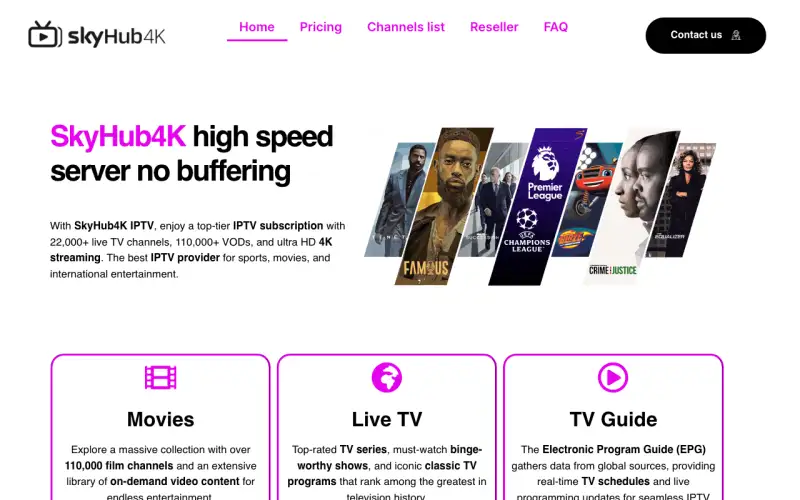
On ww3.skyhub4k.org the main headline is “SkyHub4K high speed server no buffering”.
- Advertises 22,000+ live channels (the store’s own figure).
- Names Firestick, Fire TV, Android, iOS, Smart TV, Samsung as supported devices.
- Promotes 4K streams, a TV guide (EPG) and a reseller programme.
- Publishes a refund or money-back policy.
Its homepage sections are “Movies”, “Live TV”, “TV Guide”, “1 Months” and “3 Months”.
Providers that put Ultra HD first. 4K only pays off if your TV, your streaming device and your connection can all carry it.
Is SkyHub 4K a one-off store?
Its storefront is its own: no other provider in our directory uses the same layout and wording as SkyHub 4K.
SkyHub 4K plans and prices
| Plan | Price | Per month | Saving |
|---|---|---|---|
| 1 month | $14.95 | $14.95 | — |
| 3 months | $29.95 | $9.98 | 33% |
| 6 months | $44.95 | $7.49 | 50% |
| 12 months | $59.95 | $5.00 | 67% |
SkyHub 4K charges exactly what Drogon Tv does on every plan length, so price will not separate them. Compare channels, device plans and support instead.
SkyHub 4K vs Drogon Tv
| Point | SkyHub 4K | Drogon Tv |
|---|---|---|
| 1 month | $14.95 | $14.95 |
| 12 months | $59.95 | $59.95 |
| 24 months | Not listed | $99.95 |
| 2 and 3 device plans | Not stated | Yes |
| Refund policy published | Yes | Yes (72 h outage, duplicate charge, 7 days) |
| Support | Not stated | Telegram @host4k |
To test Drogon Tv against SkyHub 4K yourself, a one month plan costs $14.95 on drogontvshop.com. For a wider view, read Drogon Tv vs other IPTV services.
How to set up SkyHub 4K
Setting up SkyHub 4K follows the usual IPTV routine: install a player, enter the login from your welcome email and load the channels.
- Install a player such as IPTV Smarters Pro or TiviMate from your device app store.
- Open the welcome email from SkyHub 4K and copy the Xtream login (server, username, password) or the M3U link.
- Add the details in the app, then add the EPG link if one was supplied.
- Let the channels load and test a live channel and the TV guide.
The same steps work for Drogon Tv; see Drogon Tv channels: sports, news, entertainment and countries and How to install Drogon Tv on Firestick.
Who SkyHub 4K suits
- Viewers with a 4K TV and a fast, wired connection
- Sport fans who want the sharpest picture for live matches
- Anyone upgrading from a Full HD service
SkyHub 4K FAQ
Where is the real SkyHub 4K site?
The live store is ww3.skyhub4k.org and the main domain is skyhub4k.org. Bookmark them so you never land on a look-alike.
What are the SkyHub 4K prices?
Plans start at $14.95 for one month; the longest plan, 12 months, costs $59.95, or $5.00 a month.
Is SkyHub 4K cheaper than Drogon Tv?
No, the two stores charge the same on every plan. Drogon Tv starts at $14.95 for 1 month and $4.16 a month on 24 months.
Which app works with SkyHub 4K?
Any standard IPTV player that accepts Xtream Codes or M3U logins, such as IPTV Smarters Pro or TiviMate.